
Trader Tax Calculator India: Every Field, Card and PDF
October 14, 2026 · ~12 min read · by Shivam Kushwaha, HeyArtha founder
Trader Tax Calculator
Compute tax on equity delivery, intraday speculation and F&O derivatives with FIFO lot matching, turnover and multi-head income consolidation.
Your broker's tax P&L is in one tab and the form wants a "turnover calculation method" and an "unabsorbed amount". This guide walks through the trader tax calculator India traders can use for tax year 2026-27, field by field in page order, then every result card and the PDF.
Trader tax calculator India: what it works out for 2026-27
HeyArtha's Trader Tax Calculator takes your F&O, intraday, delivery and currency results (or prop-firm payouts), your salary and past losses, and works out tax for tax year 2026-27 under the Income-tax Act 2025: tax payable or refund, the ITR form, whether a tax audit applies, losses carried forward and advance tax instalments.
It runs in your browser, shows the section behind every step, and lists anything the law leaves open for your CA. Treat it as a worked draft to check.
Last reviewed: October 2026. Figures refer to tax year 2026-27 (1 April 2026 to 31 March 2027), Income-tax Act 2025 as amended by Finance Act 2026.
Open the Trader Tax Calculator next to this page and follow along.
Step 1: the four choices on the setup screen
Before the desk opens, the calculator asks four things that decide which rules apply.
| On screen | Options | What it changes |
|---|---|---|
| Financial Year | FY 2026-27 (AY 2027-28), fixed | Only this year is supported |
| Residential Status | Resident in India (default), Non-Resident (NR / RNOR) | Residents get the Schedule FA worksheet; non-residents get a CA review note |
| Tax Regime | New Regime (default), Old Regime | Old regime adds deduction boxes and, with business income, a reminder that the option must be filed by the return due date |
| Whose capital is being traded? | Your Own Capital (Path A), Firm-Funded Account (Path B) | Path A: Indian segment cards and a foreign broker ledger. Path B: prop payouts, costs and a presumptive comparison |
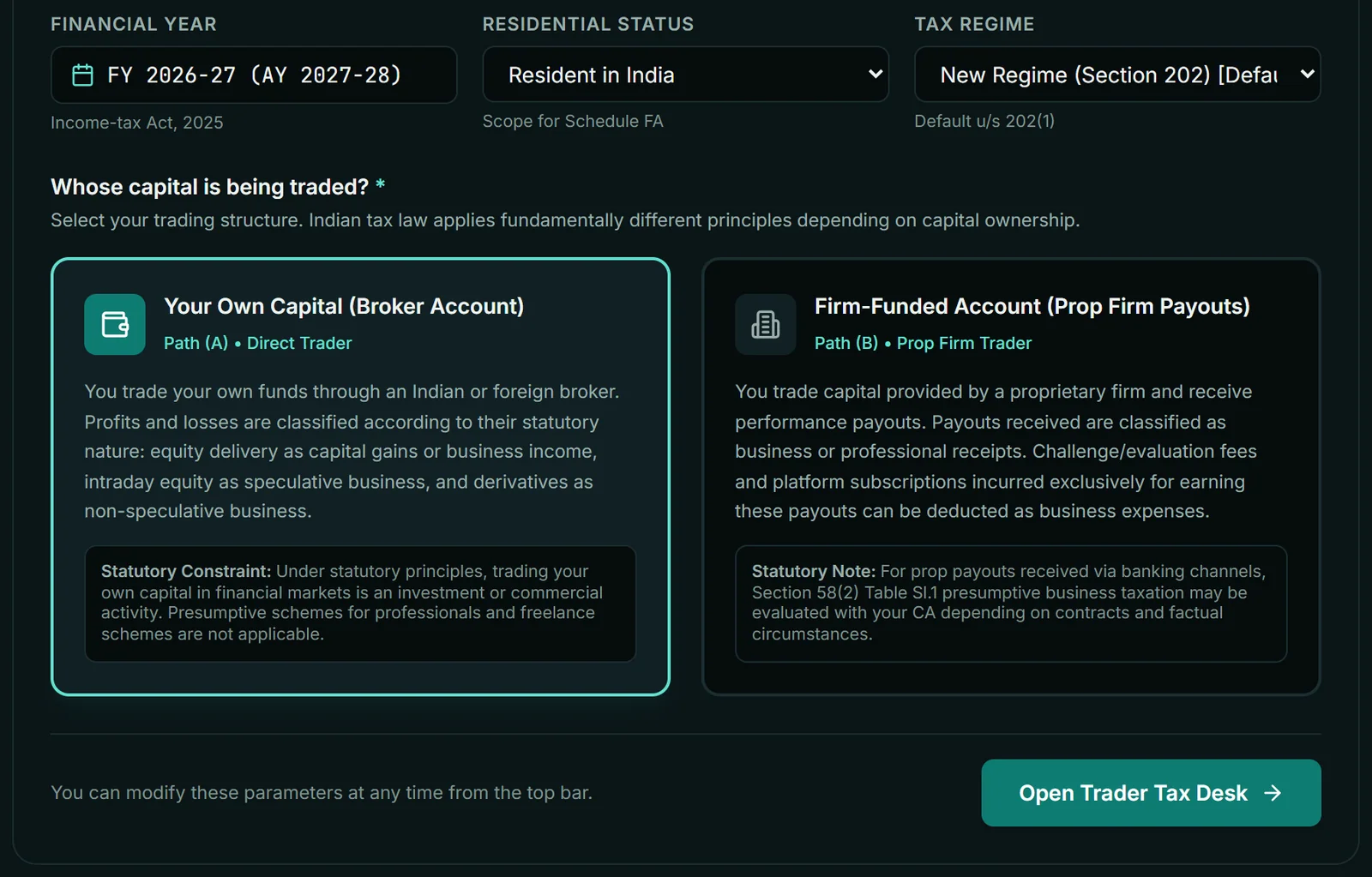
Click Open Trader Tax Desk. Change Setup in the top bar brings this screen back. There is no age question; everyone is treated as under 60.
Step 2: what to type in each segment card
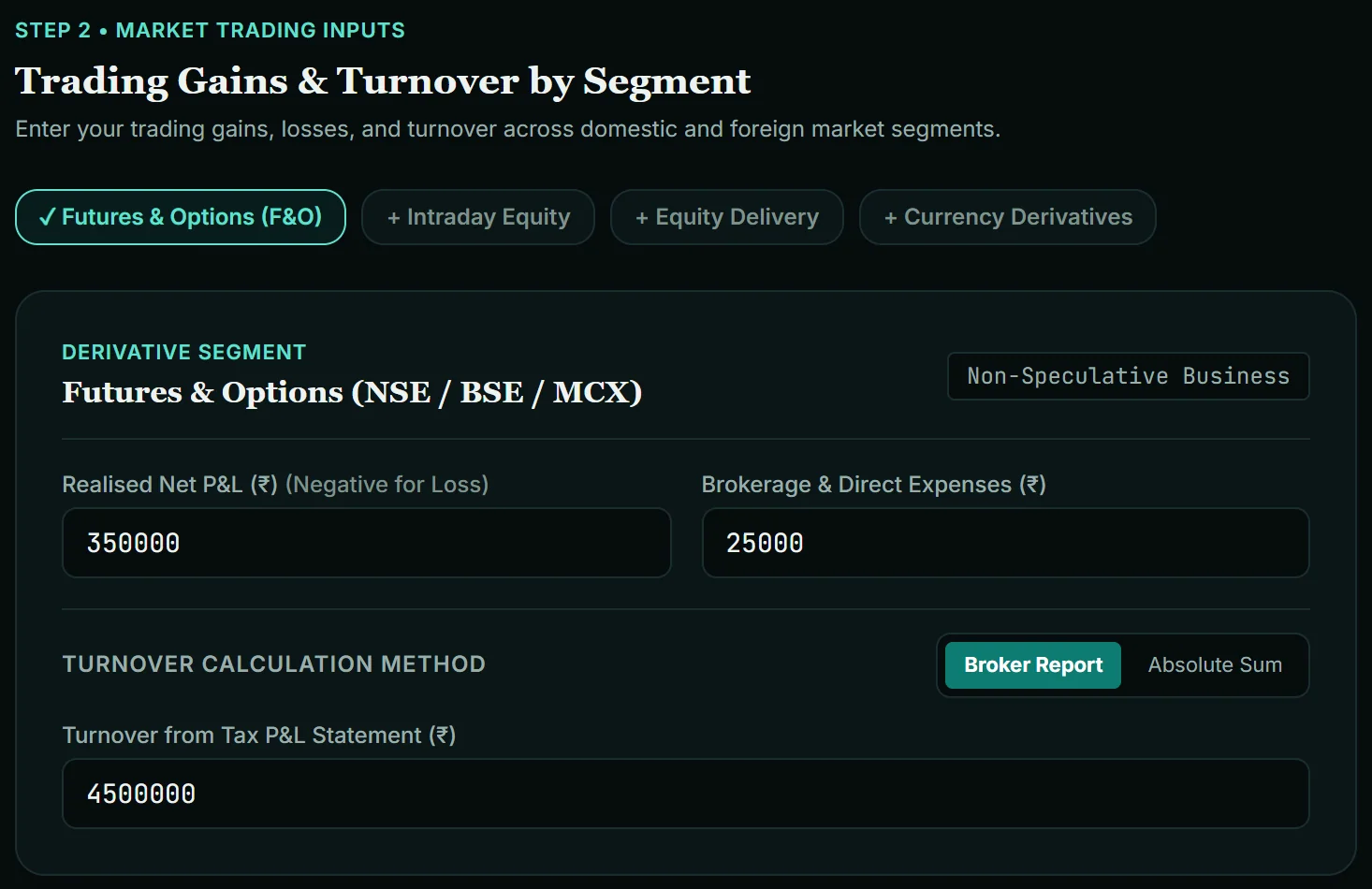
Path A starts with four chips: Futures & Options (F&O), Intraday Equity, Equity Delivery and Currency Derivatives. F&O is on by default; tap a chip to add its card. With all chips off you get "No trading segment entered".
Watch out: the F&O card does not open empty. In October 2026 it showed sample figures of ₹3,50,000 profit, ₹25,000 expenses and ₹45,00,000 turnover. Overwrite all three, or switch the chip off.
| Card | Field (as labelled) | What to type | Rule behind it |
|---|---|---|---|
| F&O | Realised Net P&L (₹) (Negative for Loss) | Year's realised profit or loss from your broker's tax P&L, before charges | Exchange-traded derivatives are carved out of "speculative", so this is non-speculative business: s.66(31), s.66(33) (s.43(5)) |
| F&O | Brokerage & Direct Expenses (₹) | Brokerage, exchange charges, STT and other costs you claim | STT is deductible against business income: s.32(k) (s.36(1)(xv)) |
| Intraday Equity | Realised Net P&L, Brokerage & Expenses | Same, for intraday equity | Speculative business, kept separate: s.66(31), s.26(3) (s.28 / 43(5)) |
| Equity Delivery | Tax Treatment; then Short-Term / Long-Term Capital Gains/Loss (Capital Gains) or Realised Net P&L and Brokerage & Expenses (Business Income) | Capital Gains (default): net gains or losses. Business Income: profit or loss before charges, and the charges | 20%: s.196 (s.111A); 12.5% above ₹1,25,000: s.198 (s.112A). STT not deductible: s.72(3)(b) (s.48). Business Income adds a CA review note |
| Currency Derivatives | Realised Net P&L (₹), Brokerage & Direct Charges (₹) | USDINR, EURINR, GBPINR results | Non-speculative business |
If your broker's P&L is already net of charges, type 0 for expenses so nothing is deducted twice. My guide to reading your trading P&L statement shows which report holds which number.
Turnover: Broker Report or Absolute Sum
Every business card has a Turnover Calculation Method toggle. Broker Report takes the turnover printed on your tax P&L. Absolute Sum takes "Favourable Differences / Profits (₹)" and "Unfavourable Differences / Losses (₹)", both positive, and adds them.
For F&O, the ICAI Guidance Note on Tax Audit (Revised 2025), para 5.11(b) takes turnover as the absolute total of favourable and unfavourable differences, with premium on options sold included unless already inside the net profit. Notional contract value is sometimes used for turnover, but the Guidance Note does not use it, and it would inflate turnover many times over. I found no paragraph settling intraday turnover the same way, so the tool flags the method for your CA.
Two warnings come from here: "Turnover missing" (profit entered, turnover 0) and "Turnover looks too low" (turnover below net profit). The methodology page shows the formula.
If you chose Path B: prop firm payouts
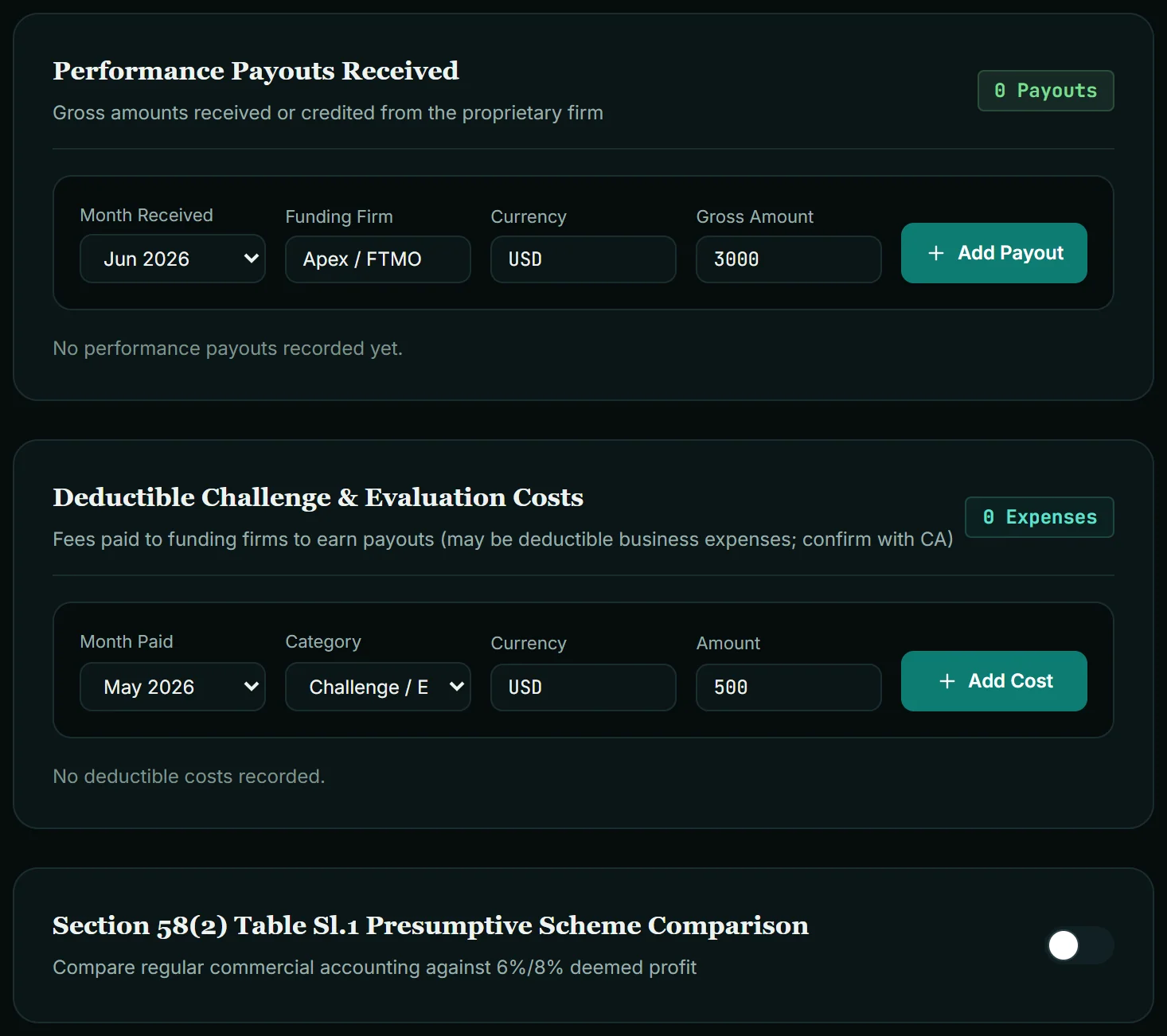
Path B replaces the segment cards with two lists. Payouts: Month Received, Funding Firm, Currency (such as USD) and Gross Amount, then Add Payout. Costs: Month Paid, Category (Challenge / Evaluation fee, Trading platform fee, Market data subscription, Other operating cost), Currency and Amount, then Add Cost. Both forms come pre-filled with sample values ("Apex / FTMO", USD 3,000; USD 500), so change them before adding.
Foreign amounts are converted under Rule 206 of the Income-tax Rules 2026 (rule 115 of the 1962 Rules): for business income, at the SBI TT buying rate on the last day of the tax year, one rate for the year rather than one per payout. For 2026-27 that is 31 March 2027, not yet published in October 2026. Type an estimate and tick This is my estimate (rate not published yet); results stay marked provisional until you replace it.
The classification is contested. Some treat payouts as business income and others argue for foreign-source treatment. It depends on your contract and facts, so confirm with your CA. The same applies to the Presumptive Scheme Comparison toggle (actual profit against a 6% or 8% deemed profit): a comparison to discuss, not a filing decision. Background: how prop firms evaluate funded accounts.
Losses, salary and the 5% cash test
These appear on both paths.
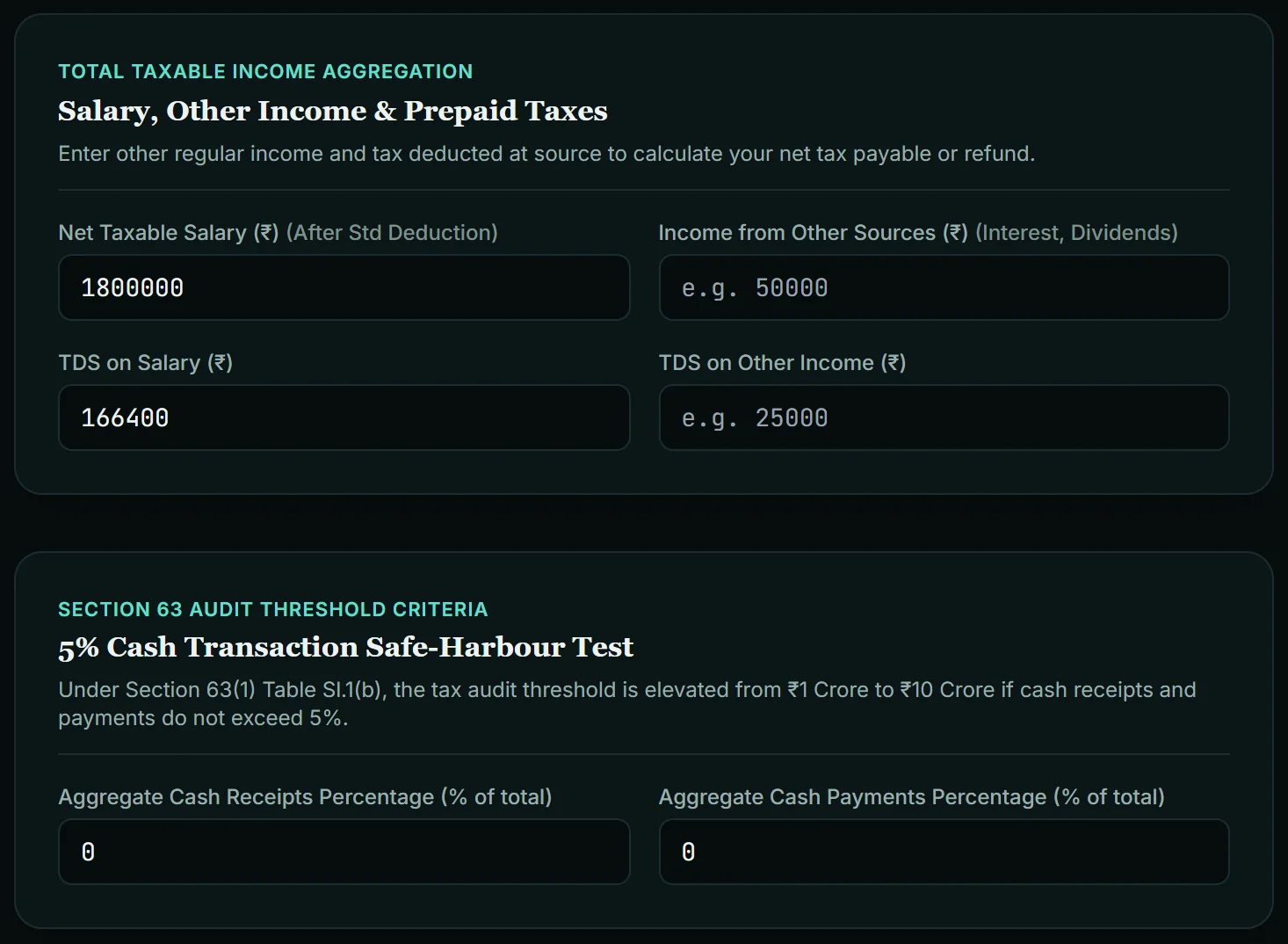
Brought-forward losses. Pick Loss Nature (speculative, non-speculative F&O, short-term or long-term capital loss), Assessment Year, Unabsorbed Amount (₹) and Filed on time u/s 121, then Add Loss. The form shows ₹50,000 by default, but nothing counts until you press Add Loss.
The tick box matters most. A loss carries forward only if it was determined in a return filed by the due date under s.263(1): s.121 (s.80 read with s.139(3)). Untick it and the loss shows "Belated (Disallowed)". A non-speculative loss runs 8 tax years, s.112 (s.72); a speculative loss 4, and only against speculative profit, s.113 (s.73). The tool warns when a loss has expired or is in its last year.
Salary and other income. Net Taxable Salary (₹) (After Std Deduction) is the taxable salary on your Form 16, not gross pay. Then Income from Other Sources, TDS on Salary and TDS on Other Income. On the old regime, deduction boxes for PF/ELSS/life insurance (capped at ₹1.5 lakh) and health insurance appear here.
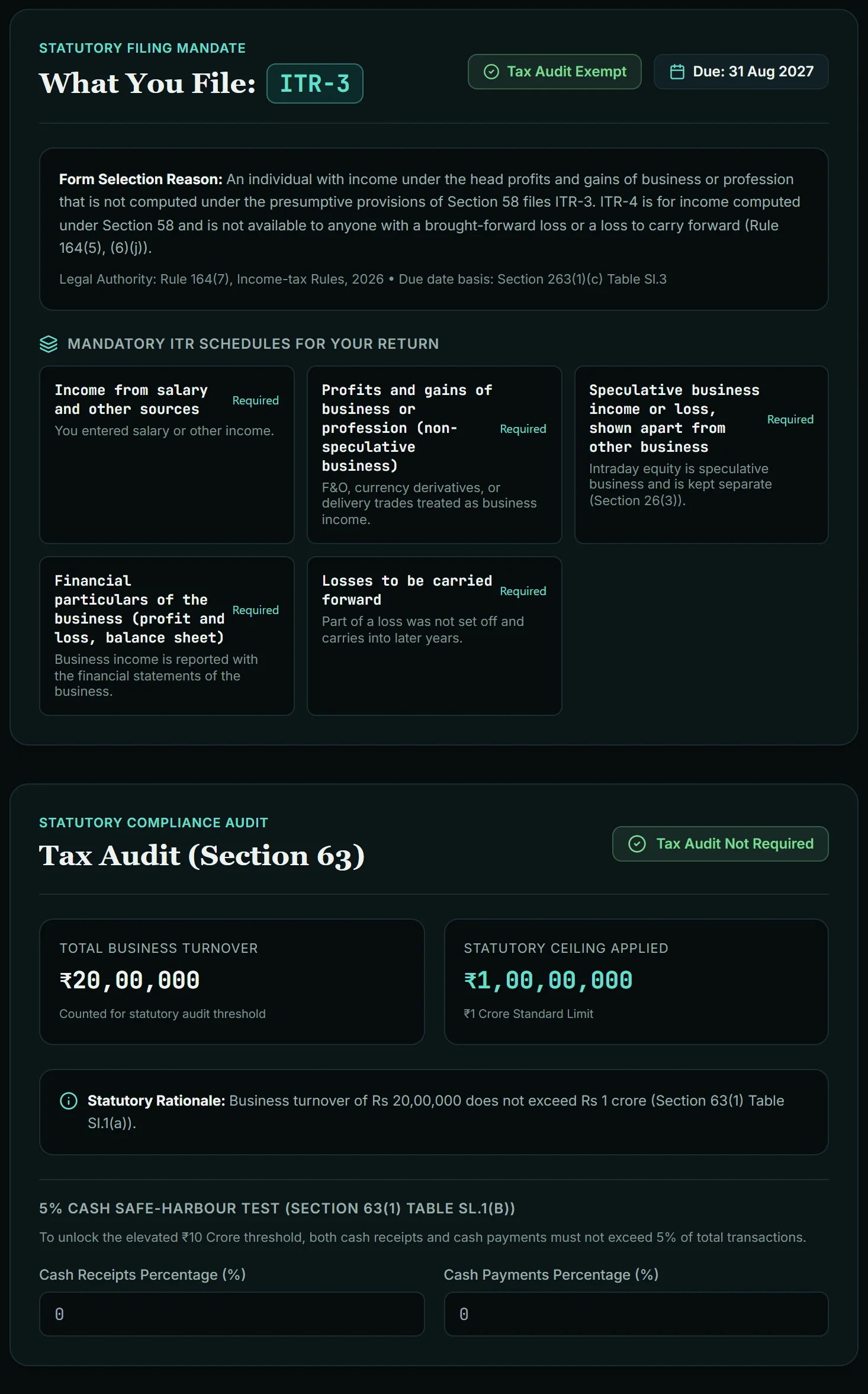
The 5% cash test. Aggregate Cash Receipts and Cash Payments Percentage. Under s.63 (s.44AB), a tax audit applies when business turnover crosses ₹1 crore, or ₹10 crore if cash receipts and cash payments are each within 5%. Blank is not the same as 0: blank means "not answered", and with turnover between ₹1 crore and ₹10 crore you get "Cash share needed for the audit answer". If all your trading money moved through a bank, 0 is the true answer.
Type this: F&O profit, intraday loss and a salary
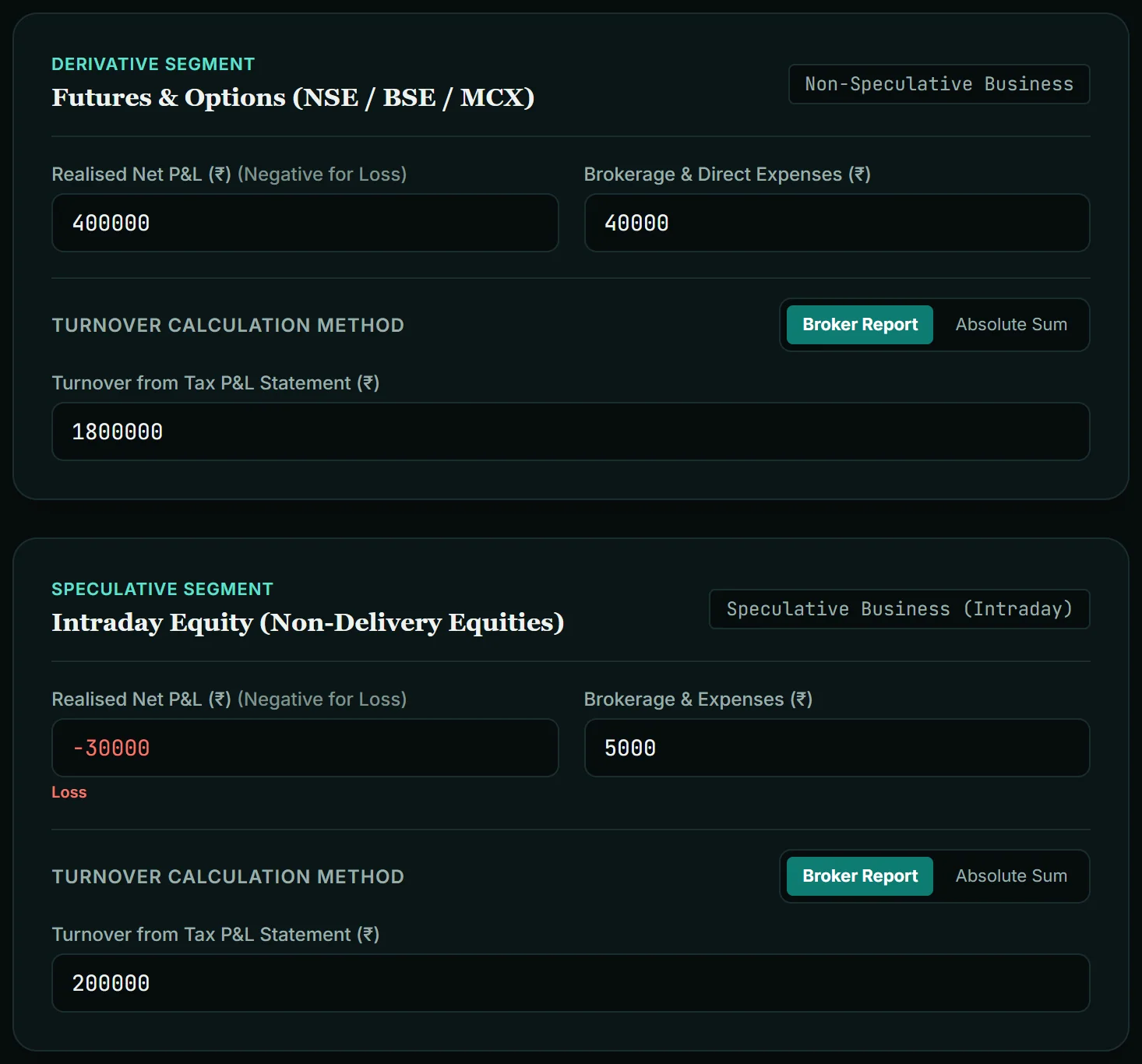
The person here is invented to show the arithmetic. Setup: Resident in India, New Regime, Your Own Capital. Switch on the Intraday Equity chip, then type:
| Field | Type this |
|---|---|
| F&O: Realised Net P&L | 400000 |
| F&O: Brokerage & Direct Expenses | 40000 |
| F&O: Turnover from Tax P&L Statement (Broker Report) | 1800000 |
| Intraday: Realised Net P&L | -30000 |
| Intraday: Brokerage & Expenses | 5000 |
| Intraday: Turnover from Tax P&L Statement (Broker Report) | 200000 |
| Net Taxable Salary (After Std Deduction) | 1800000 |
| TDS on Salary | 166400 |
| Cash receipts % and cash payments % | 0 and 0 |
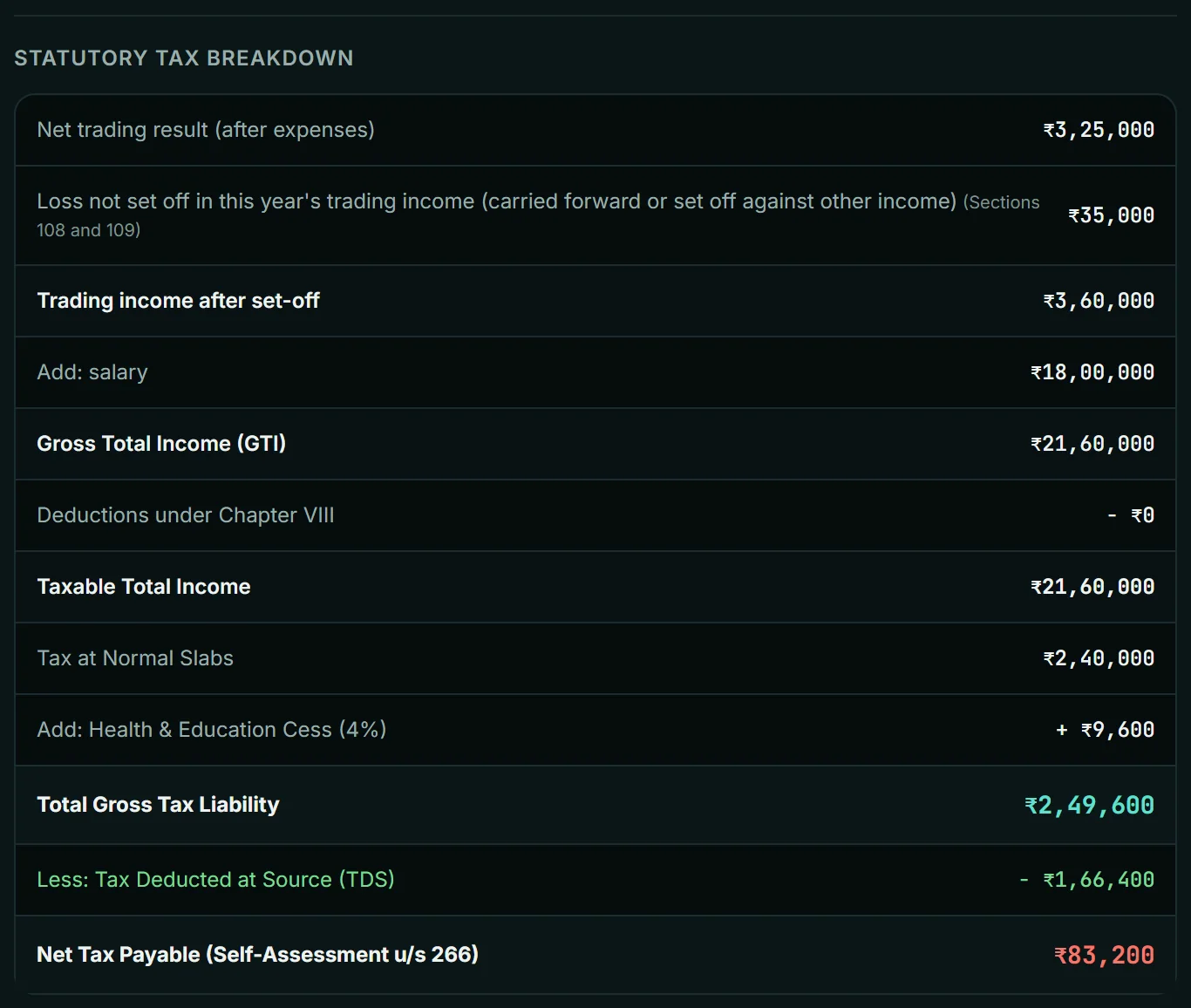
What the tool showed when I ran this in October 2026, and where each number comes from:
| Result | Tool shows | Working |
|---|---|---|
| F&O business income | ₹3,60,000 | 4,00,000 − 40,000 |
| Intraday result | −₹35,000 | −30,000 − 5,000; speculative, so it cannot touch the F&O profit or salary, s.113 (s.73) |
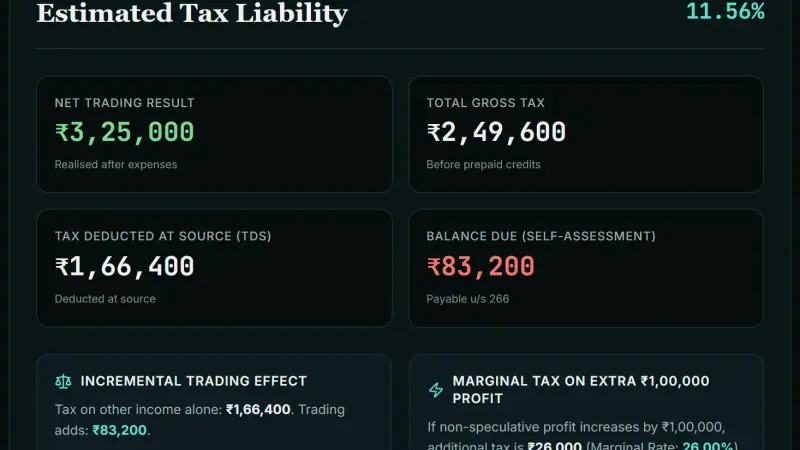
| Net Trading Result | ₹3,25,000 | 3,60,000 − 35,000 |
| Gross Total Income | ₹21,60,000 | 18,00,000 salary + 3,60,000 F&O; the intraday loss is carried forward, not set off |
| Tax at Normal Slabs | ₹2,40,000 | New-regime slabs: 5% of ₹4–8 lakh (20,000) + 10% of ₹8–12 lakh (40,000) + 15% of ₹12–16 lakh (60,000) + 20% of ₹16–20 lakh (80,000) + 25% of ₹1,60,000 (40,000) |
| Health & Education Cess | ₹9,600 | 4% of 2,40,000 |
| Total Gross Tax | ₹2,49,600 | 2,40,000 + 9,600 |
| Balance Due | ₹83,200 | 2,49,600 − 1,66,400 TDS |
| Effective Tax Rate | 11.56% | 2,49,600 ÷ 21,60,000 |
| Tax on other income alone / Trading adds | ₹1,66,400 / ₹83,200 | Tax on ₹18 lakh salary alone is 1,60,000 + 4% cess |
| Marginal tax on extra ₹1,00,000 | ₹26,000 (26%) | Next lakh falls in the 25% slab, plus 4% cess |
| Tax audit | Not required | Turnover ₹20,00,000 is below ₹1 crore |
| ITR form | ITR-3 | Business income, not under the presumptive scheme |
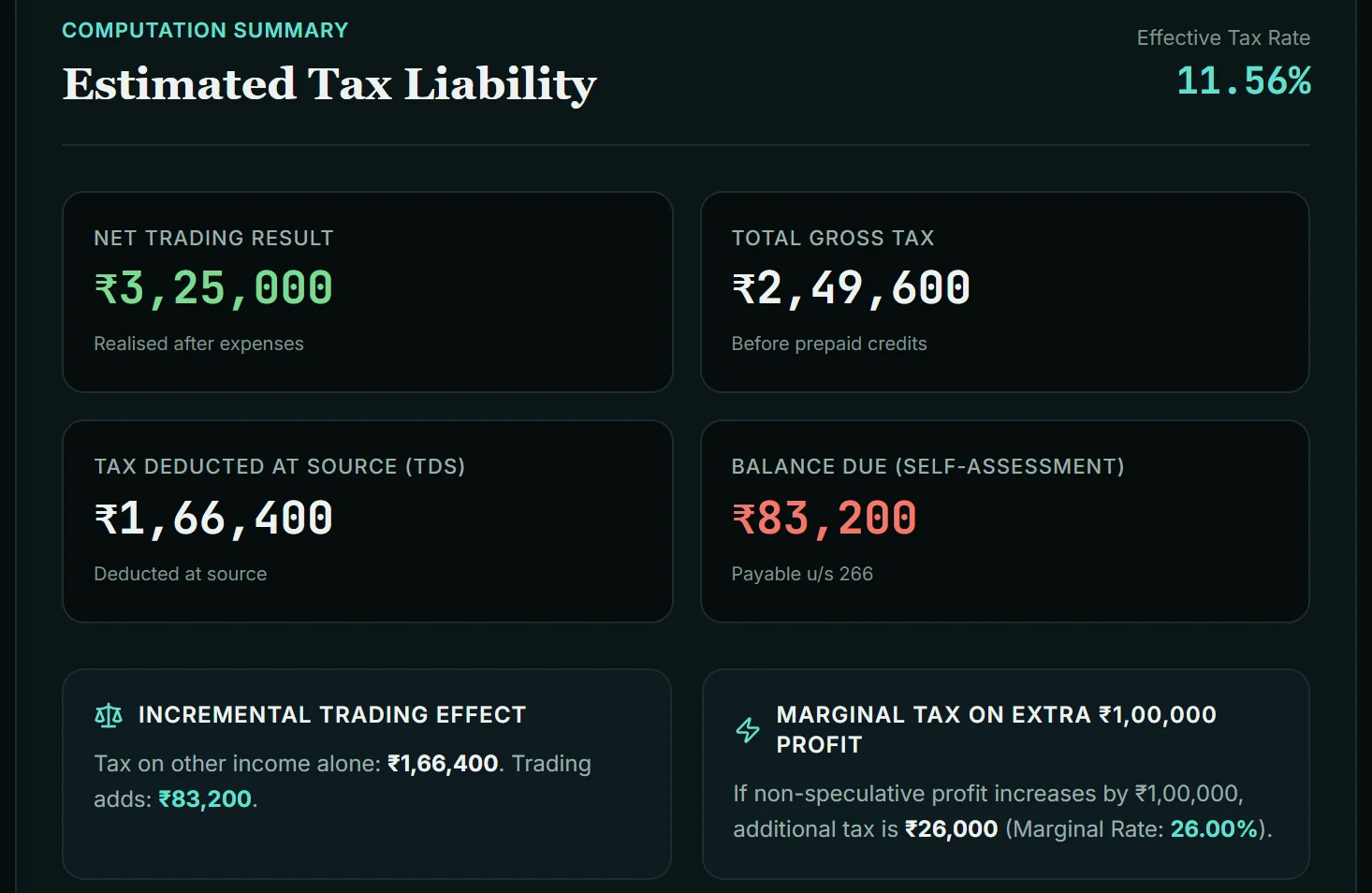
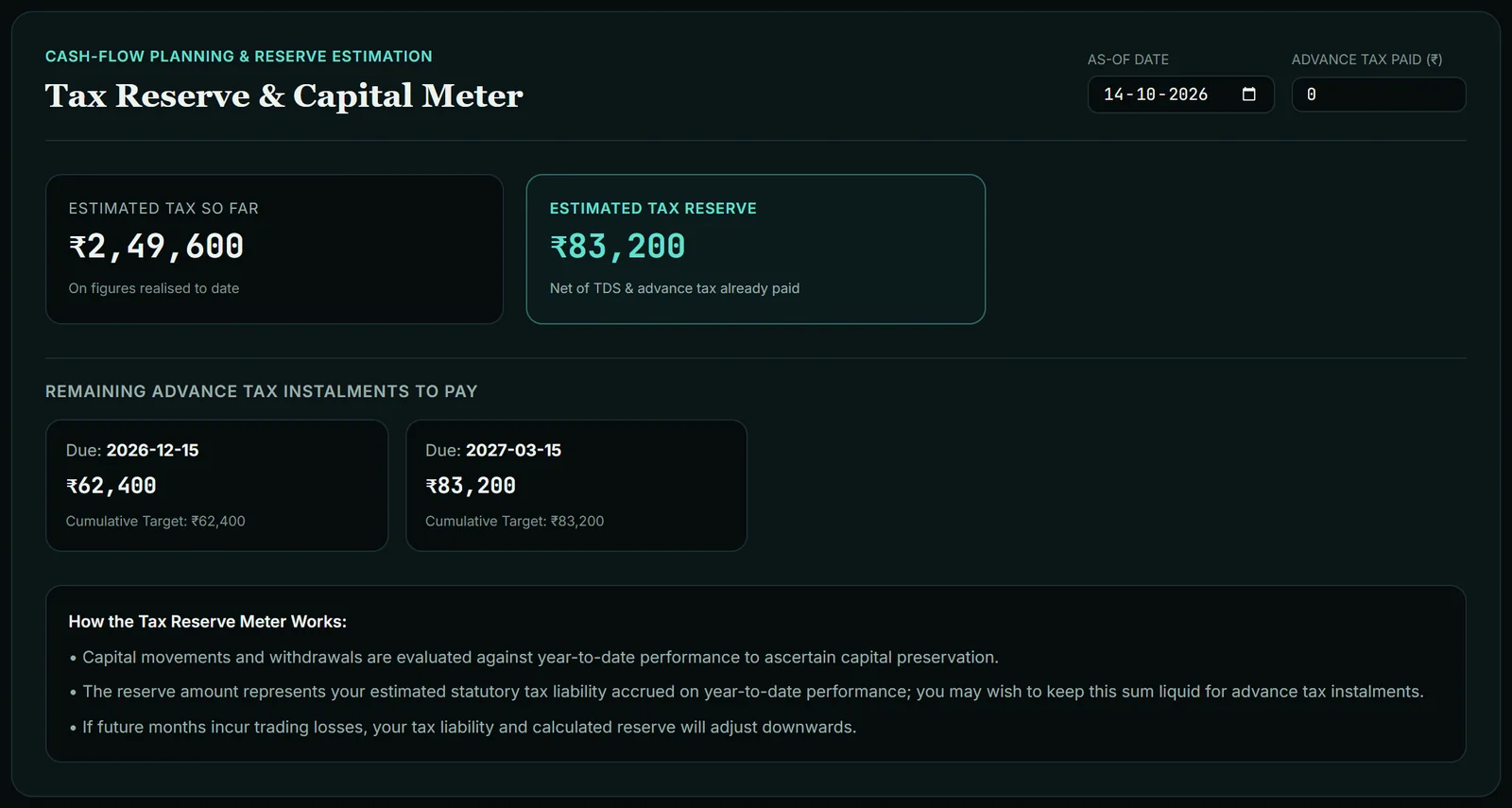
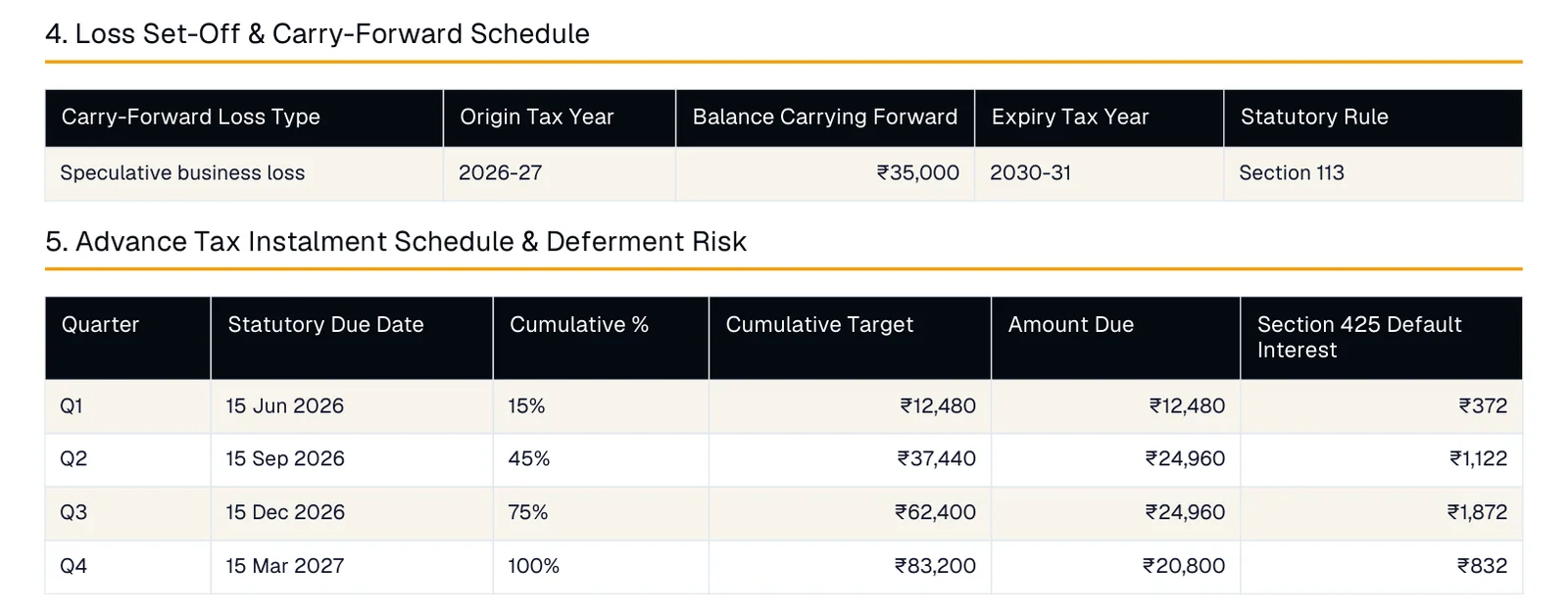
Two things stand out. The employer's TDS covered the salary tax in full, so all ₹83,200 of tax caused by trading is unpaid. And because that is above ₹10,000, advance tax applies, s.404 (s.208): cumulative targets of ₹12,480 by 15 June, ₹37,440 by 15 September, ₹62,400 by 15 December and ₹83,200 by 15 March (15%, 45%, 75%, 100%).
The ₹35,000 intraday loss carries forward to tax year 2030-31, but only if the return is filed by the due date, which the Loss Protection note in the side panel spells out.
Reading every result card
The Overview & Filing tab shows these, top to bottom (the example's values are in the table above).
| Card | What the number means |
|---|---|
| What You File | ITR form, audit status, return due date and the ITR schedules you need, each with its reason |
| Effective Tax Rate | Total tax ÷ gross total income |
| Net Trading Result | All segments after expenses, losses included |
| Total Gross Tax | Slab tax + special-rate tax on capital gains + surcharge + cess, less any rebate, before TDS |
| Tax Deducted at Source | TDS on salary + TDS on other income |
| Balance Due / Estimated Refund Due | What you still owe, or what comes back |
| Incremental Trading Effect | Tax with no trading, and the extra tax trading causes |
| Marginal Tax on Extra ₹1,00,000 Profit | What one more lakh of F&O profit would cost |
| Statutory Compliance Audit | Business turnover, the ceiling applied (₹1 crore or ₹10 crore) and why |
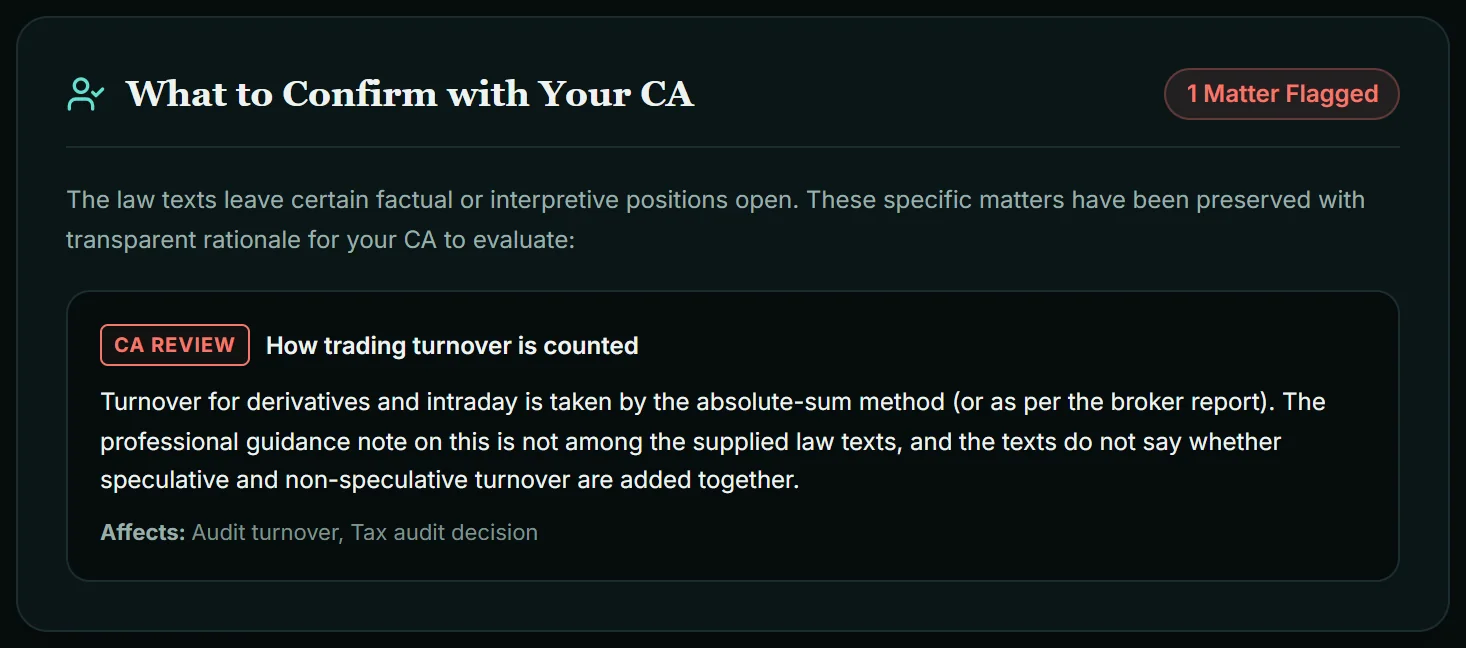
| What to Confirm with Your CA | Positions the law texts leave open (in the example, how turnover is counted) |
Then come the Statutory Tax Breakdown, the Glass-Box Statutory Calculation Trace (25 steps here, each with its section) and the Live Tax Summary panel with Save Scenario. The banner "Lower-than-presumptive-profit test not checked" is information, not an error: that test only applies if you declared presumptive profit earlier.
The other tabs:
- Ledger & FX: a monthly ledger for foreign broker accounts (Realised P&L, Fees / Swaps, Deposits, Withdrawals, Ending Balance, Peak Balance) with a Matches, Does not match or Missing badge for each month, the Rule 206 rates, and for residents a Schedule FA worksheet (Peak Conversion Rate, Closing Rate (31 Dec)). Schedule FA's rules come from the ITR form instructions, not the Act, so follow the instructions in force when you file.
- Tax Reserve: enter As-Of Date and Advance Tax Paid (₹) to see Estimated Tax So Far, Estimated Tax Reserve and instalments still to pay. On 14 October 2026 the example showed ₹62,400 due by 15 December and ₹83,200 by 15 March, cumulative. Advance tax for traders explains how those instalments and the interest work.
- PDF Pack: the report and a record-keeping checklist.
Saved scenarios stay on this device. Backup / Restore downloads your ledger, payouts, costs and rates as a JSON file.
What the PDF report contains
On the PDF Pack tab, add an optional report reference and download "Trader Tax Report, Tax Year 2026-27". Sections are numbered in order and skipped when they do not apply, so numbers shift; in the example, the ITR mapping prints as section 6.
| Section | What it holds | Appears |
|---|---|---|
| Filing Overview & Statutory Obligations | ITR FORM, TAX AUDIT REQUIRED, NEXT DUE DATE, RETURN DUE DATE, with reasons | Always |
| Tax Computation & Marginal Assessment | Each income head, basis and amount, plus the extra-₹1-lakh check | Always |
| Trading Classification & Segment Turnover | Classification, P&L, expenses, net result, audit turnover per segment | Always |
| Loss Set-Off & Carry-Forward Schedule | What was set off and what carries forward to which year | With a loss |
| Advance Tax Instalment Schedule & Deferment Risk | Four instalments and s.425 (s.234C) interest if nothing is paid | When advance tax applies |
| Monthly Foreign Ledger & SBI TT Conversion (Rule 206) | Monthly foreign figures, rate, rupee value | Foreign accounts or payouts |
| Schedule FA Foreign Depository / Custodial Accounts | Peak and closing balances in rupees | Residents with foreign accounts |
| ITR Form Schedule Mapping Lines | Where each figure goes in the return | Usually |
| Appendix A, B, C | CA matters, full trace, record-keeping checklist | A only when something is flagged |
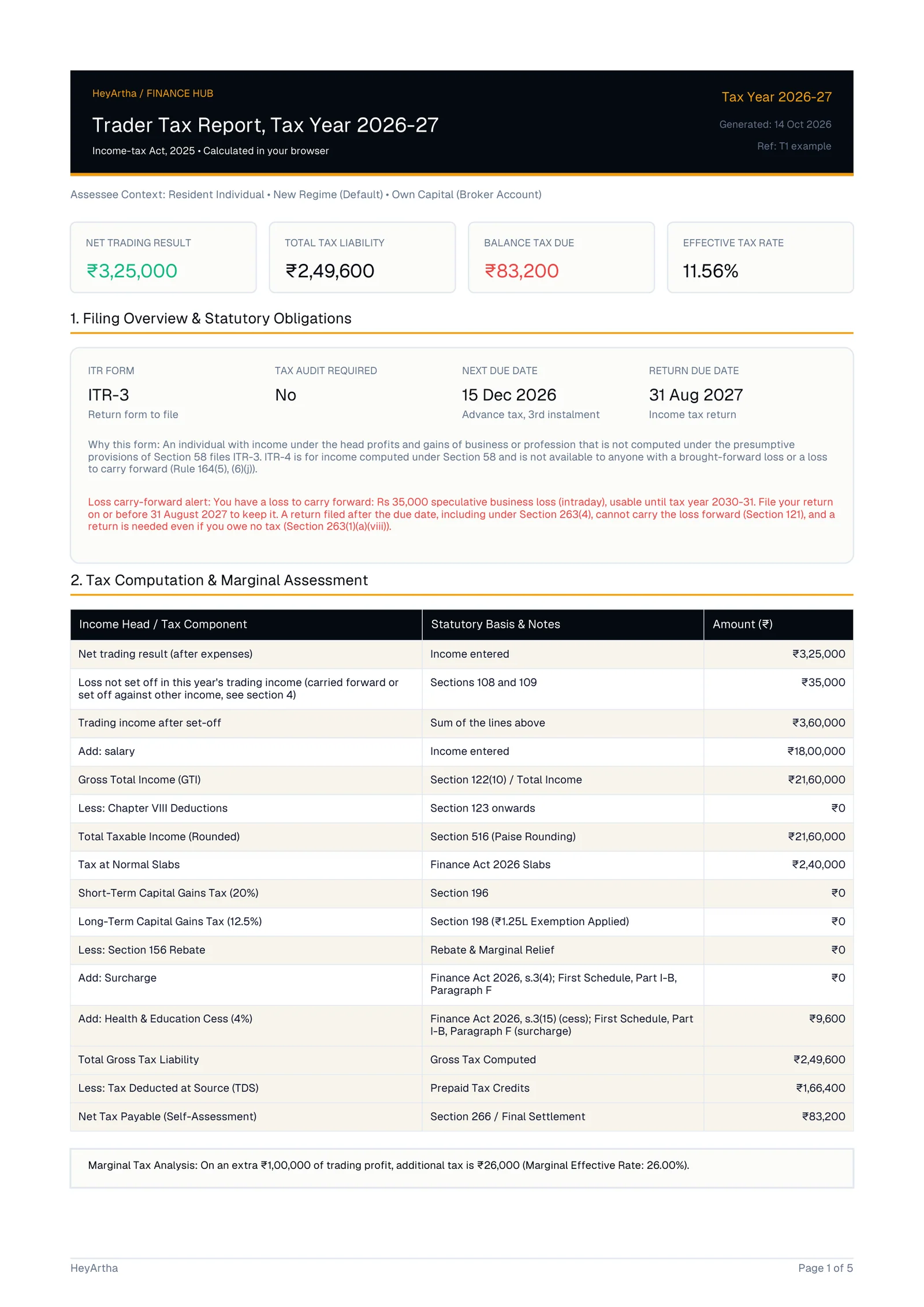
The notices close the report. Take the whole PDF to your CA; Appendix A is the part they most need.
Limits: what this calculator does not do
From the tool's scope notes and gaps I found while documenting it.
- No age selector. Everyone is treated as under 60; a senior citizen's slab result may differ.
- Delivery as business income is your call to confirm. Switch Equity Delivery to Business Income and the card shows its own Realised Net P&L and Brokerage & Expenses boxes, and only those are computed. Whether your delivery trades are business income at all is a question for your CA.
- No GST, including registration or LUT questions on prop payouts.
- No foreign tax credit. Foreign tax paid is converted and listed; the credit and Form 67 are not computed.
- No FEMA view. Income is taxable whether or not the activity is permitted under FEMA; compliance is not assessed.
- No crypto, and no recomputation of broker charges, STT or per-trade profit.
- Contested positions stay open. Prop payout classification, presumptive eligibility and turnover counting go to your CA.
- Not reviewed by a Chartered Accountant. It shows its working so a CA can check it quickly, not instead of that check.
For costs and how each segment is taxed, see brokerage and tax on trading income; more in the Traders guides and the tax tools hub. Then run your own figures through the Trader Tax Calculator and download the PDF before your CA meeting.
Three worked personas: trading tax examples for delivery, F&O and prop payouts, each computed by hand and checked against the calculator. For errors traders commonly make, see F&O tax mistakes in India. For the bucket-by-bucket map of how each kind of trading income is taxed, read How Trading Income Is Taxed in India.
Sources: Income-tax Act 2025 as amended by Finance Act 2026, Income-tax Rules 2026, ICAI Guidance Note on Tax Audit (Revised 2025). Full list: trading tax sources.
Quick answers
Things people usually want to know.
Why does the F&O card already show numbers when I open the calculator?
The desk opens with sample F&O figures (₹3,50,000 profit, ₹25,000 expenses, ₹45,00,000 turnover) so the result cards are not blank. They are not yours. Overwrite all three with your broker's figures, or switch the F&O chip off if you did not trade F&O this year.
Should I use the P&L from my broker's tax P&L report or adjust it first?
Start from the broker's tax P&L. The calculator does not recompute charges, STT or per-trade profit. Enter realised P&L before charges in the P&L box and the charges you claim in the expenses box. If your broker's figure is already after charges, enter 0 as expenses so nothing is deducted twice.
Can STT and brokerage be offset against F&O trading profit?
Against business income, yes. STT is deductible when the trades are in the course of the business and the income is taxed under that head, s.32(k) (s.36(1)(xv)). Brokerage is a trading cost too. Enter both in Brokerage & Direct Expenses. STT is not deductible against capital gains, s.72(3)(b) (s.48).
Are intraday and F&O turnover calculated separately or added together?
Each card has its own turnover, and the calculator adds them into one business turnover for the audit test. The law texts do not say whether speculative and non-speculative turnover are added, so the tool lists this under What to Confirm with Your CA instead of treating it as settled.
I have an F&O loss and salary income. Do I need a tax audit to report the loss?
The audit test in s.63 (s.44AB) is turnover-based: above ₹1 crore, or ₹10 crore when cash receipts and cash payments are each within 5%. The Act has no separate loss limb. A separate test applies if you used the presumptive scheme earlier. Confirm your own case with a CA.
Can I carry forward an options trading loss under the new tax regime?
The carry-forward rule for a non-speculative business loss, s.112 (s.72), has no regime condition in its text, and the calculator carries the loss forward under either regime if the return is filed by the due date, s.121. Views on this differ, so confirm with your CA.
If I trade F&O, is advance tax compulsory even if my profit is small?
Only if your tax for the year, after TDS, is ₹10,000 or more, s.404 (s.208). The Tax Reserve tab shows what is still due on the next instalment dates. A shortfall attracts interest under s.424 (s.234B) and s.425 (s.234C).
Which ITR form does the calculator suggest for F&O and intraday traders?
With F&O or intraday income computed normally (not under the presumptive scheme), the What You File box shows ITR-3 and lists the schedules that apply, such as speculative income kept apart from other business and losses to carry forward. It explains its reason under Form Selection Reason.
Does the calculator work for prop firm payouts?
Yes, through the Firm-Funded Account path. You add each payout and each challenge or platform fee, and foreign amounts are converted at the SBI TT buying rate under Rule 206. How payouts are classified is contested, so the tool flags it for your CA. GST is not computed.
Are my trading figures sent to HeyArtha's servers?
No. The calculation runs in your browser and inputs are not sent to the server. Saved scenarios stay on the device you saved them on. To move your ledger to another device, use Backup / Restore, which downloads a JSON file you can load later.
More from HeyArtha
Other things we've been writing about.
Brokerage & Tax on Trading Income in India (2026 Guide)
What Zerodha actually charges, how STT changed in 2026, and how F&O, intraday and delivery profits are taxed, in a real numbers breakdown.
How to Read Your Trading P&L Statement (India Guide)
Contract note, tax P&L, turnover: what each report actually shows and why your bank credit never matches the number on screen.
Common Beginner Mistakes in F&O Trading (2026)
The theta trap, no-stop-loss trading, and blindly following tips. The structural mistakes that quietly cost beginners the most.