
Business Income Tax Calculator India: Field-by-Field Guide
October 16, 2026 · 9 min read · by Shivam Kushwaha, HeyArtha founder
Business Income Tax Calculator
Reconcile commercial P&L to taxable PGBP income and compare Old vs New regimes with every step shown.
If you freelance or run a small business and keep books, your tax is not 6% or 50% of anything. It is your profit after the Income-tax Act's own rules, taxed at slab rates, plus interest if you paid nothing in advance. The Business Income Tax Calculator on HeyArtha follows that route. This guide goes through the form in the order the page shows it, with two worked examples and one add-back you can try yourself.
What does a business income tax calculator do?
The Business Income Tax Calculator turns your books into a tax figure the way the Income-tax Act, 2025 does. It starts from commercial profit, adds back what the Act disallows, subtracts tax depreciation, applies slab rates and cess, then adds interest for missed advance tax. It also shows your audit and books-of-account status.
You can open it at /tools/tax/regular. The calculation runs in your browser. It is built for people who maintain books. If you would rather declare a deemed profit, read the Presumptive Tax Calculator guide first, because the two routes follow different rules. The rules behind each step are listed on the methodology page.
Which period, profile and mode should you pick?
Start at the top of the form, under "Taxpayer Profile & Activity Setup".
- Period. The default is Tax Year 2026-27 under the Income-tax Act, 2025. A legacy option for tax year 2025-26 (assessment year 2026-27) uses the 1961 Act section numbers, so you will see Section 44AB and 115BAC there instead of Section 63 and 202.
- Profile. Three buttons: "Salary or other income only (no business or profession)", "Solo Professional / Freelancer" and "Sole Proprietor / Business". Pick the second or third to open the business sections.
- Mode. Guided Mode shows all six sections on one page. Expert Mode splits the same inputs into tabs: Commercial P&L, Statutory Add-Backs, Block Depreciation, Other Heads & Deductions, and Taxes & Advance Tax. The numbers are the same in both.
- Regime. New regime (Section 202) is the default. You can switch it, and the Regime Comparison panel at the bottom shows both.
Type this: a freelancer with Rs 20 lakh of receipts
Here is a first run you can copy. All figures are illustrative.
| Field | What to enter |
|---|---|
| Period | Tax Year 2026-27 |
| Profile | Solo Professional / Freelancer |
| Gross Operating Revenue / Receipts (₹) | 20,00,000 |
| Other Commercial Deductible Expenses (₹) | 5,00,000 |
| Everything else | Leave at the default |
The Final Tax Settlement card then shows:
| Row on the card | Value |
|---|---|
| Taxable PGBP Income | ₹15,00,000 |
| Gross Total Income (GTI) | ₹15,00,000 |
| Total Taxable Income (Section 516) | ₹15,00,000 |
| Total Gross Tax Liability | ₹1,09,200 |
| Less: Prepaid Credits (TDS + TCS) | ₹0 |
| Less: Advance Tax Paid (by 31 Mar) | ₹0 |
| Add: Interest (Section 423, Section 424, Section 425) | ₹10,971 |
| TOTAL AMOUNT PAYABLE | ₹1,20,170 |
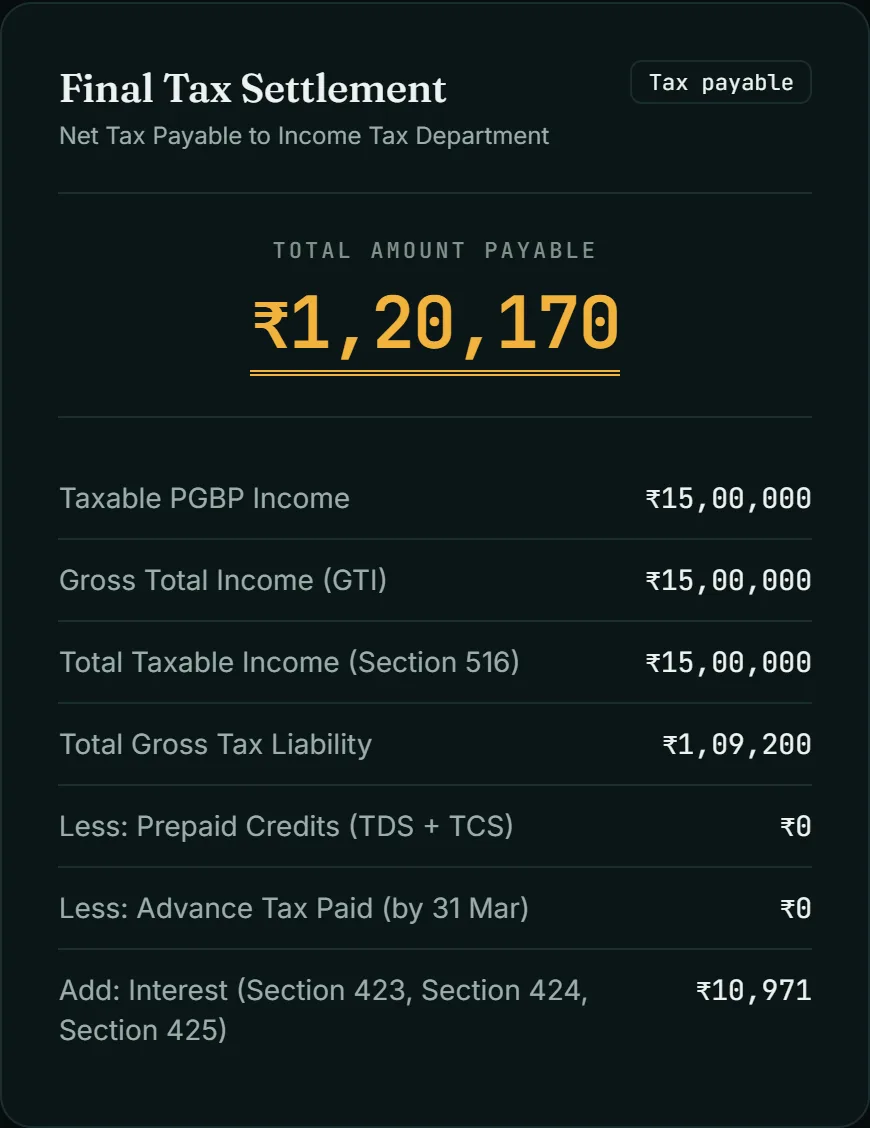
The card shows the tax as one total, so here is the working behind it. Under the new regime the slabs are nil up to Rs 4 lakh, 5% from 4 to 8 lakh, 10% from 8 to 12 lakh and 15% from 12 to 16 lakh. On Rs 15 lakh that is 20,000 + 40,000 + 45,000 = 1,05,000. Add 4% cess (4,200) and you reach 1,09,200. There is no rebate under Section 156 because income is above Rs 12 lakh.
The interest figure comes from two sections. Section 424 charges 1% a month on the tax; the calculator counts five months, April to August 2027, for a 31 Aug 2027 filing: 1,09,200 × 1% × 5 = 5,460. Section 425 charges 3% on each of the first three advance tax shortfalls and 1% on the last, with each shortfall rounded down to the nearest Rs 100: 489 + 1,473 + 2,457 + 1,092 = 5,511. Together that is 10,971.
Tax plus interest is 1,20,171. The tool rounds the final amount to the nearest Rs 10 under Section 516, so it shows 1,20,170.
What goes in each section of the form?
Guided Mode has six numbered sections. This table follows the labels on the page.
| Section | What it asks | The rule behind it |
|---|---|---|
| 1. Taxpayer Profile & Activity Setup | Entity, residential status, regime, age category, specified profession, receipts of the three earlier years | Books of account under Section 62 and Rule 46 of the Income-tax Rules, 2026 |
| 2. Commercial Operating Revenue & Expenses | Gross receipts, cash share of receipts, cash payments as a percentage of all payments, and expenses by type | Starting point is your commercial profit |
| 3. Statutory Tax Adjustments (Schedule BP Add-Backs) | Direct Taxes & Cess Debited, Resident Payments w/o TDS, Employee PF/ESI Credited After the Return Due Date, Taxes and Dues Unpaid at the Return Due Date, Delayed MSME Invoices, Personal / Mixed Expense Portion, Cash Payments > ₹10,000 / Day, Non-PGBP Income in Books | Sections 29(1)(e), 34(1), 35, 36(4) and 37 |
| 4. 5-Block Asset Register & Depreciation (Section 33) | Opening WDV, additions in the year, disposals, per block | Section 33 and the rate table in the Income-tax Rules, 2026 |
| 5. Imported Other Heads & Chapter VI-A Deductions | Salary, house property, capital gains, other sources, employer NPS contribution | Aggregation and Chapter VIII deductions |
| 6. Prepaid Taxes, Advance Tax & Filing Date | TDS and TCS credits, advance tax in four windows, self-assessment tax, anticipated filing date | Sections 408, 424 and 425 |
Three fields in section 2 and 3 repay a closer look.
Digital / Non-Cash Receipts Ratio. It starts at 95%, which means the form assumes 5% of your receipts are cash. If your real cash share is higher, change it, because the audit limit for business turnover depends on it.
Cash payments as a percentage of all payments. This field is blank by default. For a business, the higher Rs 10 crore audit limit needs both cash receipts and cash payments to be 5% or less, so the calculator cannot apply it without your number.
Delayed MSME Invoices. Section 37(2)(g) lets you deduct an amount payable to a micro or small enterprise beyond the time limit in Section 15 of the MSMED Act, 2006 only in the year you actually pay it. Enter the unpaid part here.
Add-backs and depreciation: one disallowed expense changes the bill
An add-back is an expense you booked that the Act does not allow, so it is put back into profit. Try it on the freelancer example. Keep everything the same and enter 50,000 in "Personal / Mixed Expense Portion (₹)", for example the personal share of a phone and internet bill. Section 34(1) allows only expenditure laid out wholly and exclusively for the business, and personal expenses are excluded.
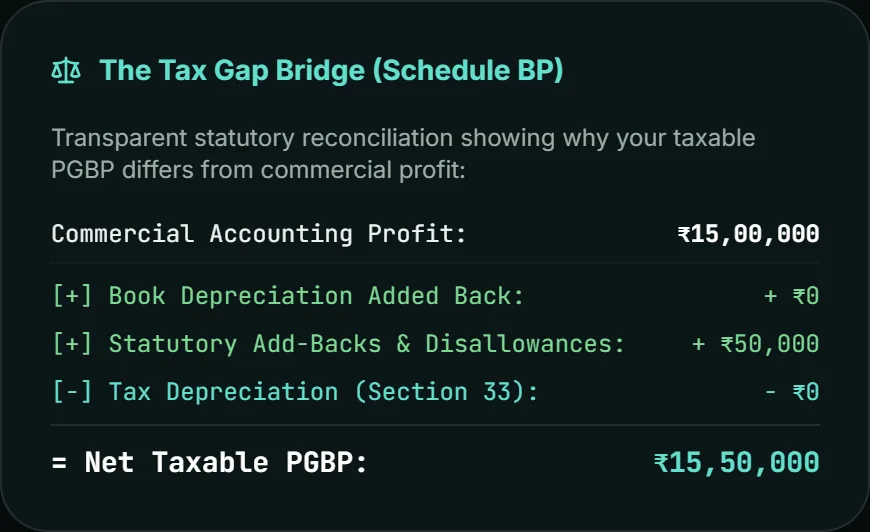
The Tax Gap Bridge on the results page now shows:
| Bridge row | Value |
|---|---|
| Commercial Accounting Profit | ₹15,00,000 |
| [+] Statutory Add-Backs & Disallowances | + ₹50,000 |
| = Net Taxable PGBP | ₹15,50,000 |
Total gross tax becomes 1,17,000, interest becomes 11,754 and the amount payable becomes ₹1,28,750. So the Rs 50,000 you could not claim cost 7,800 in tax and 783 in interest, 8,583 in all. That is 15% slab tax plus 4% cess on 50,000, plus the extra interest. The final amount payable moves by 8,580 (1,20,170 to 1,28,750) because the tool rounds to the nearest Rs 10.
The other add-backs follow the same pattern. Tax paid on income (Direct Taxes & Cess Debited) is not deductible under Section 35(a). Cash payments above Rs 10,000 a day that are not made through a specified banking or online mode are disallowed under Section 36(4). Employee PF and ESI contributions are allowed if credited on or before the return due date under Section 29(1)(e), as substituted by the Finance Act, 2026.
Depreciation works the other way. Book depreciation is added back, then Section 33 depreciation on the five blocks of assets is subtracted. An asset acquired in the year and used for less than 180 days gets 50% of the prescribed rate under Section 33(4). The depreciation fields stay empty in the examples here, so test your own register against your CA's schedule.
How do you read the result page?
Below the settlement card you will find four blocks.
- The Tax Gap Bridge (Schedule BP). It reconciles commercial profit to taxable profit in five lines. If the add-back row is not 0, you know which disallowance changed your tax.
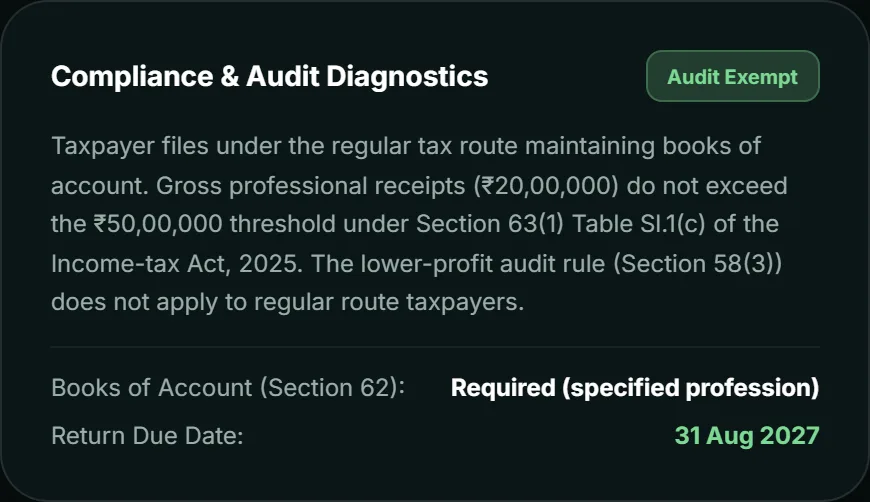
- Compliance & Audit Diagnostics. For the freelancer example it shows "Audit Exempt" because receipts of Rs 20 lakh are below the Rs 50 lakh limit in Section 63(1), and "Books of Account (Section 62): Required (specified profession)". It also shows the return due date, 31 Aug 2027.
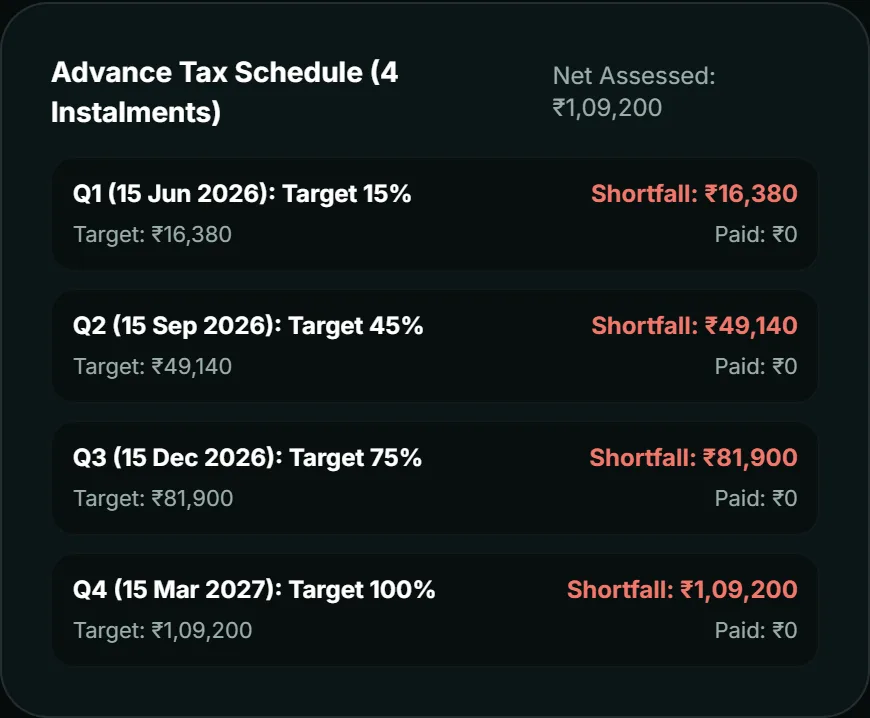
- Advance Tax Schedule (4 Instalments). It lists the target for each date and what you paid. In the example every instalment shows 0 paid, which is why interest appears. Section 425(2) removes interest if you paid at least 12% by 15 Jun 2026 and 36% by 15 Sep 2026. In the engine, paying 13,104 by 15 Jun 2026 and 39,312 in all by 15 Sep 2026 on the freelancer example leaves no shortfall in those two instalments; the interest that remains comes from the December and March instalments.
- Regime Comparison. It shows the tax under both regimes. For the freelancer example: new 1,09,200, old 2,73,000, a difference of 1,63,800. The old-regime figure here has no deductions entered, so treat it as a starting comparison, not a final one.
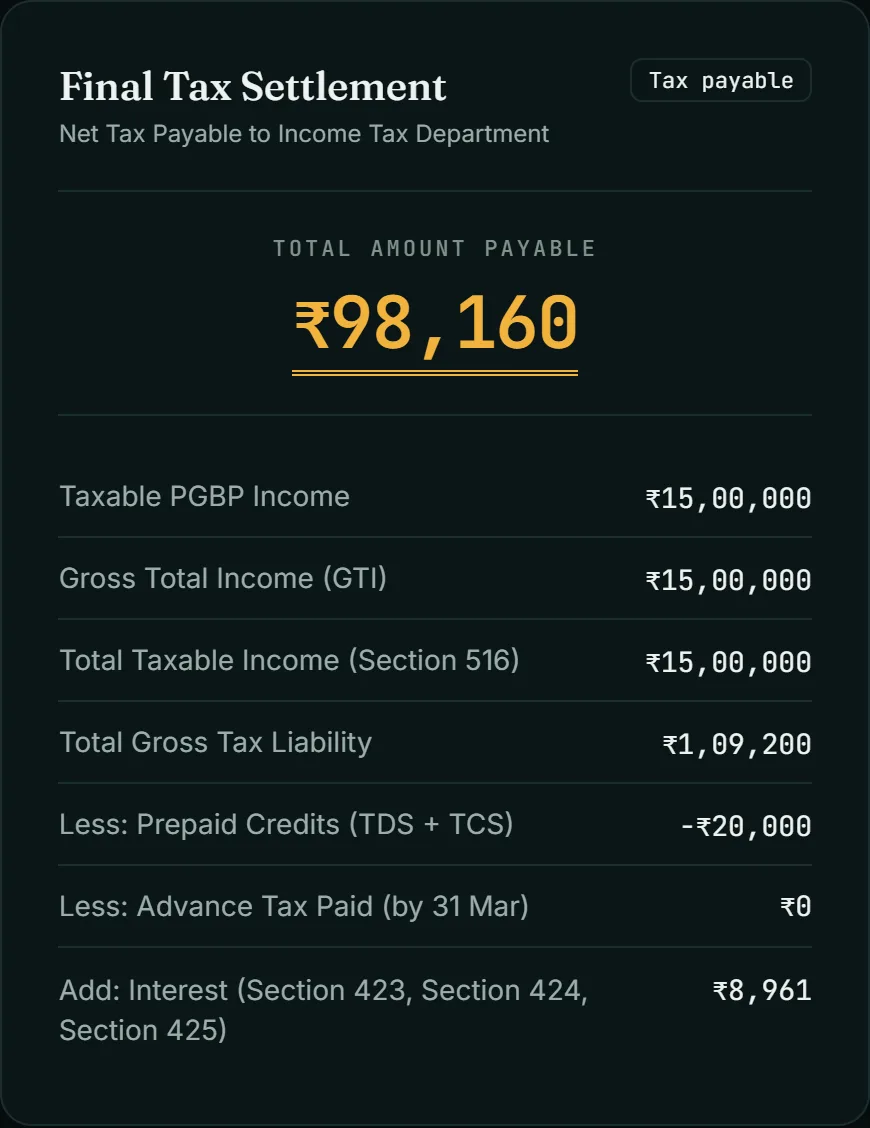
A business example shows TDS at work. Choose "Sole Proprietor / Business", enter receipts of 80,00,000, other commercial deductible expenses of 65,00,000 and TDS credits claimed of 20,000. Taxable income is again Rs 15 lakh and gross tax 1,09,200. The TDS reduces the amount on which interest is worked out, interest comes to 8,961, and the total payable is ₹98,160. The diagnostics card says turnover of Rs 80 lakh is within the limits of Section 63(1).
Limits of this calculator
- It does not replace your books. Everything depends on the figures you enter.
- It does not file a return. The result card does not name an ITR form; the page disclaimer mentions ITR-3, so confirm the form with your CA.
- The examples in this guide stop at taxable income of Rs 15.5 lakh. Check your own figures if you are far above that.
- The page has a lock-in checkbox for people who opted out of presumptive taxation earlier. I have not checked its wording against the Act, so take it up with your CA.
- Fields such as Resident Payments w/o TDS follow rules I did not trace for this guide. The tool's trace page shows the section it applies.
- It uses the default filing date of 31 Aug 2027 unless you change the Anticipated Return Filing Date field. Interest changes with the date.
- It is an educational tool. It is not tax advice. Not reviewed by a Chartered Accountant.
Last reviewed: October 2026, for Tax Year 2026-27. Rules and rates change, so check the official Act and Rules on the Income Tax Department website before you file.
If you are still deciding how to structure the business, read sole proprietorship vs Pvt Ltd vs LLP. To see how the other tools fit together, open the tax tools hub or the blog.
Next in series: Advance tax for traders in India, which covers the instalment dates and interest in more detail.
Quick answers
Things people usually want to know.
Is this calculator for people who use presumptive taxation?
No. It is for people who keep books and want tax on actual profit. If you want to declare 50% of receipts or 6%/8% of turnover under Section 58(2), use the separate Presumptive Tax Calculator. The page shows a banner that points to it.
Which tax regime does the calculator use by default?
The new regime under Section 202 is the default. A Regime Comparison panel also shows the old-regime tax for the same inputs. In the freelancer example below it shows 1,09,200 for the new regime and 2,73,000 for the old, with no deductions entered.
Why is a personal expense added back to my profit?
Section 34(1) allows only expenses laid out wholly and exclusively for the business or profession, and it excludes personal expenses of the assessee. Enter the personal part of a mixed expense in the Personal / Mixed Expense Portion field and the calculator adds it back.
When does a professional need a tax audit in this calculator?
The calculator applies the Rs 50 lakh gross receipts limit for professions under Section 63(1) and says so on the Compliance and Audit Diagnostics card. The cash relaxation does not apply to professions. Other audit triggers depend on your facts, so confirm with your CA.
What is the audit limit for business turnover here?
Rs 1 crore of turnover, or Rs 10 crore if both cash receipts and cash payments are 5% or less. That is why the form asks for cash payments as a percentage of all payments, in addition to the cash receipts ratio.
Why does interest show up when I have not filed yet?
The calculator assumes you file on the date in the Anticipated Return Filing Date field, which defaults to 31 Aug 2027 for Tax Year 2026-27. If you paid no advance tax, interest under Sections 424 and 425 is added. Entering advance tax paid reduces it.
How is advance tax split for someone who keeps books?
Four instalments under Section 408(1): 15% by 15 Jun 2026, 45% by 15 Sep 2026, 75% by 15 Dec 2026 and 100% by 15 Mar 2027. Section 408(2) is different. A person declaring profit under Section 58(2) Table Sl.1 or Sl.3 pays the whole amount by 15 Mar 2027.
Are employee PF and ESI contributions deductible if I pay them late?
Under Section 29(1)(e), as substituted by the Finance Act, 2026, the employee contribution is allowed if it is credited to the employee's account in the relevant fund on or before the due date for filing the return under Section 263(1).
Can a business loss reduce my salary income?
No. Section 109(1)(a) does not allow a business or profession loss to be set off against salary income. A non-speculative business loss can be carried forward for up to eight tax years under Section 112, but only if it was determined in a return filed under Section 263(1), as Section 121 provides.
How does the calculator treat depreciation?
It uses five blocks of assets with the prescribed written-down-value rates from the Income-tax Rules, 2026. Under Section 33(4), an asset acquired in the year and used for less than 180 days gets only 50% of the prescribed rate. Book depreciation is added back first.
More from HeyArtha
Other things we've been writing about.
Presumptive Tax Calculator India: Every Field and Result (2026-27)
How to use the presumptive tax calculator India 2026-27: what to type in each field, how to read every result card, the not-eligible message and the limits.
Sole Proprietorship vs Pvt Ltd vs LLP: 2026 Guide
Which structure actually fits your startup: liability, funding, ESOPs, and compliance cost compared honestly, not as a sales pitch.
After the Calculator: Advance Tax and What Traders File (2026-27)
Advance tax for traders in India, 2026-27: the Rs 10,000 test, four instalment dates, s.424 and s.425 interest, which ITR form applies and a records checklist.